

bimmer-tool Lite
Category:Auto & Vehicles Developer:bimmer-tool
Size:10.5 MBRate:4.0
OS:Android 4.2+Updated:Jun 06,2026

 Download
  Application Description
Clear fault codes and monitor DPF status in BMW vehicles.
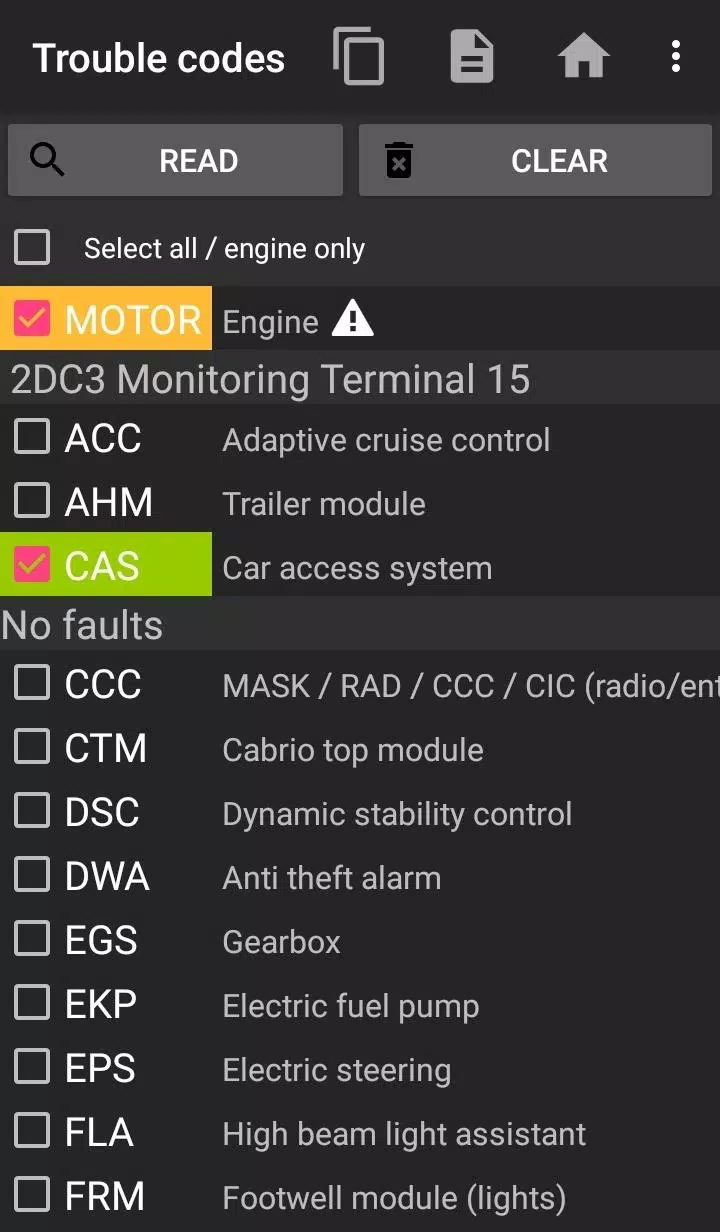
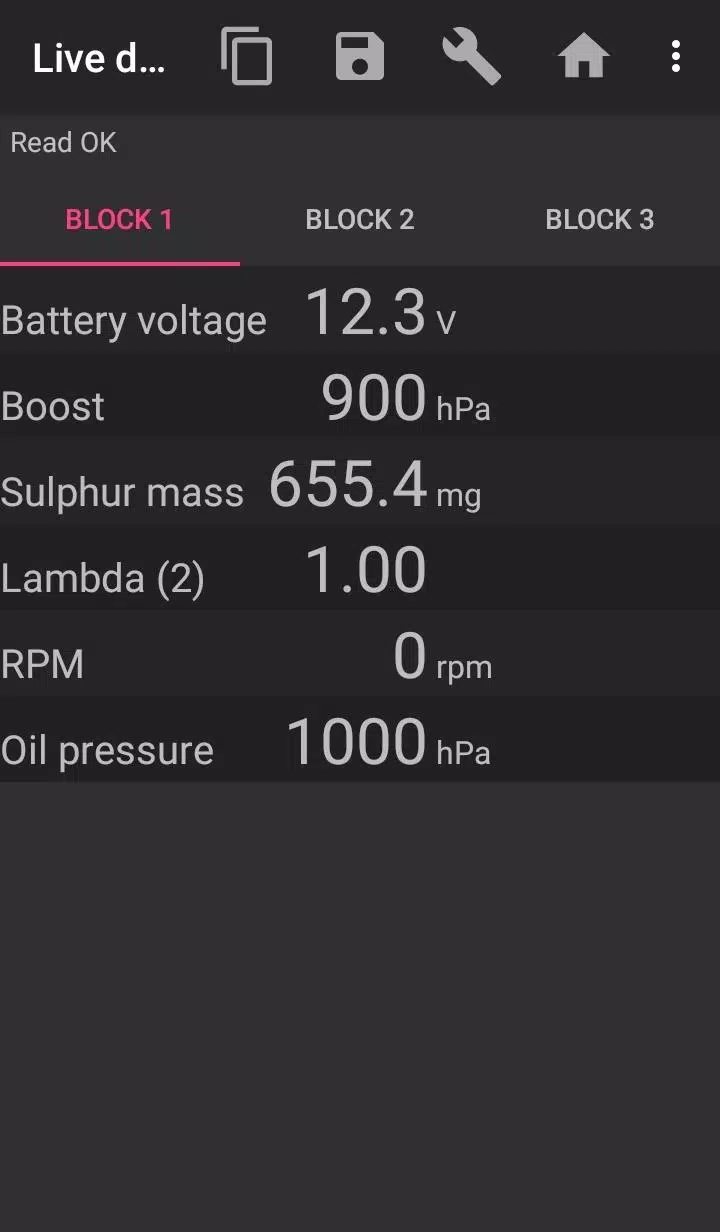
The bimmer-tool application enables you to read and clear fault codes, initiate DPF regeneration, view live engine data, and perform many other functions for BMW cars.
For vehicles with a model year prior to 2008, the application's functionality is limited, and a K+DCan USB cable connection is recommended. A wireless ELM adapter connection may not be possible or may offer limited functionality with pre-2008 models.
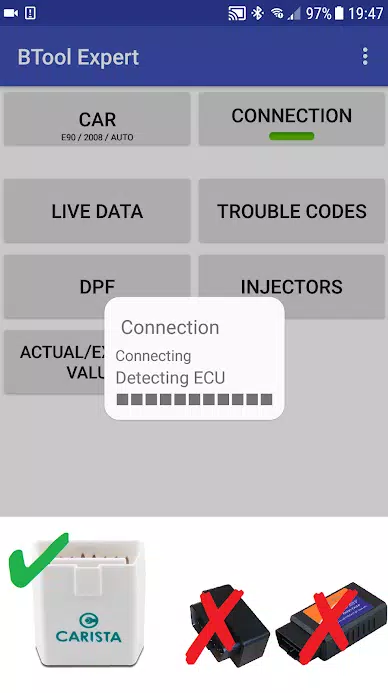
Important: This application requires a reliable OBD adapter. We recommend using a K+DCan cable, an ENET adapter (for F/G series), or one of the following Bluetooth adapters:
- Vgate vLinker MC/FS/BM/FD https://www.vgatemall.com/products/
- UniCarScan UCSI-2000/USCI-2100: Select setting: D-Can mode: MODE2 https://www.wgsoft.de/shop/obd-2-komplettsysteme/unicarscan/114/unicarscan-ucsi-2000-diagnoseadapter
https://www.bmdiag.co.uk/unicarscan-ucsi-2000-bluetooth-obd2-adapter
- Carista https://caristaapp.com/adapter
- Veepeak OBDCheck BLE https://www.veepeak.com/product/obdcheck-ble
The application allows you to:
- Read DPF regeneration status and detailed information
- Request a DPF regeneration cycle
- Reset DPF adaptation values (necessary after filter replacement)
- Read exhaust gas pressure data
- Read injector adjustment values
- Read actual and target values for air mass, intake manifold pressure, and fuel pressure
- Log data to a CSV file for further analysis
- Register a battery replacement (without altering battery coding)
- Reset lamp circuits blocked due to short-circuit faults
- Reset oil and brake service intervals**
Supported OBD Adapters
- K+D-Can USB: This is the recommended and most reliable adapter. You will also need a USB-OTG cable.
- ENET Cable/WiFi Adapter: Recommended for F & G series. For ENET cable connections, you additionally need a USB-C to Ethernet adapter.
- ELM327 Bluetooth: Bluetooth connections may be slower than USB. Only genuine ELM327 or PIC18-based adapters will work, and they may be incompatible with older engines. More information is provided below.
- ELM327 WiFi: Similar to ELM Bluetooth, WiFi connections can be less stable. On some devices, you may need to disable mobile data to use the WiFi adapter.
If you have questions or need assistance, please send an email. You can find our contact address at the bottom of the page.
Quick Start Guide
1) Connect the adapter to the OBD II port.
2) Turn the ignition to the ON position.
3) Connect the adapter to your phone:
* USB: Connect the adapter to your phone using a USB-OTG cable. Your phone will prompt you to choose an app—select the bimmer-tool app.
* Bluetooth: Go to your phone's Bluetooth settings. Search for devices and pair with the adapter (the PIN is usually 0000 or 1234).
* WiFi: Turn off mobile data. Enable WiFi and search for available networks. Connect your phone to the adapter's WiFi network.
4) Start the app, navigate to 'Car', and select your model and year.
5) Go to 'Connection' and choose the connection type, adapter type, and communication protocol.
6) Tap the 'Connect' button.
**Limitations:
For models prior to 2008 (including e46/e39/e83/e53), the app requires a K+DCan cable connection and only supports the engine ECU. Connection via a wireless ELM adapter may not be possible.
Common Problems
- 'No response' engine error in cars up to 2007 with BT/WiFi adapters. If this error occurs intermittently, try selecting the ATWM option in the advanced connection settings.
- No connection: If the adapter and protocol settings are correct but the app still cannot connect, try force-stopping all diagnostic apps in your phone's application manager (including bimmer-tool) or restart your phone and attempt to connect again.
Why Does This App Require Permissions?
- Storage: Required for USB adapter support.
- Photos/Media/Files: Allows the creation of CSV files.
- Pair with Bluetooth devices/Access Bluetooth settings: Required for Bluetooth adapter support.
- Full network access: Required for WiFi adapter support.
- Approximate location: While Bluetooth can theoretically be used to determine approximate location, this app does not read, collect, or use location data.
What's New in the Latest Version 3.7.6-L
Last updated on Nov 10, 2024
Diesel idle speed adjustment
Throttle body control
Screenshot
 Reviews
Post Comments+
Latest Apps
MORE+
Reviews
Post Comments+
Latest Apps
MORE+
-
 Motorcycle Logo Maker
Art & Design 丨 6.3 MB
 Download
-
 Butterfly Wallpaper
Art & Design 丨 20.9 MB
Download
-
 Marriage Biodata Maker
Art & Design 丨 18.3 MB
Download
-
 Food And Drink Logo Maker
Art & Design 丨 8.1 MB
Download
-
 Draw Cute Drinks
Art & Design 丨 25.3 MB
Download
-
 Animal and Pet Logo Maker
Art & Design 丨 9.5 MB
Download
Similar recommendations
MORE+
Top News
MORE+




 Topics
MORE+
Topics
MORE+
- Top Communication Apps to Boost Your Productivity
- Best Photography Editing Software
- Best Adventure Games on Android
- Ultimate Guide to Sports Apps
- Best Shooting Games for Android
- Mind-Bending Puzzle Games for Android
- Hyper Casual Games: Quick, Fun, and Easy to Play
- Professional Photography Software Review
Trending apps
MORE+
-
1
deutsch lernen durch hören A137.20M
Want to rapidly and efficiently learn German? The deutsch lernen durch hören A1 app offers a unique listening-based approach to language acquisition. Focusing on practical phrases for travel, business, and everyday life, this app makes German learning convenient and portable. Whether you're a beg
-
2

miBP31.58M
The miBP loyalty app revolutionizes rewards programs, consolidating all your loyalty cards onto your smartphone. Forget fumbling with physical cards – the miBP app offers effortless access to exclusive benefits. Registration is incredibly simple, a three-step process unlocking a world of savings.
-
3

Hêvî TV Pro15.20M
Unlock a world of Kurdish and Turkish entertainment with Hêvî TV Pro! This easy-to-use app lets you stream your favorite TV channels in stunning Full HD, plus enjoy a wide selection of radio stations anytime, anywhere. Stay up-to-date with the latest news, music, and shows – whether you're relaxing
-
4

کلینیک فوق تخصصی کاشت مو و ابر6.50M
Introducing the Premier Hair and Eyebrow Transplant Clinic: Experience unparalleled hair and eyebrow transplantation services at this leading super-specialized clinic. Headed by a former member of the Iranian national football team, this clinic boasts over 25 years of experience, guaranteeing 100%
-
5

Pretty Makeup - Beauty Camera32.90M
PrettyMakeup: Your Ultimate Selfie App for Effortless Beauty Transformations Transform your selfies effortlessly with PrettyMakeup, the ultimate selfie app! With a vast array of makeup filters, trendy hairstyles, and fun stickers, creating stunning and unique looks is a breeze. Forget complicated
-
6
Рольф: продажа и покупка авто64.1 MB
ROLF:便捷的二手车买卖及汽车服务应用 ROLF,俄罗斯最大的汽车经销商,推出官方应用,让您快速买卖二手车,并提供全面的汽车服务。应用功能包括:二手车搜索及购买、汽车诊断、维修、保养及零配件供应。 关于ROLF ROLF公司成立于1991年,如今在“二手车销售”领域排名第一,为俄罗斯汽车市场贡献了大量的车型和服务。公司拥有50多家展厅和3家大型二手车交易中心,遍布莫斯科和圣彼得堡。品牌组合涵盖34个汽车品牌,包括奥迪、北京汽车、宝沃、宝马、奇瑞、克莱斯勒、Evolute、EXEED、福特、Genesis、哈弗H6、哈弗H9、现代、JAC、捷豹、Jeep、捷途、凯翼、起亚、路虎、雷克萨斯、马自
64.1 MB
Download46.3 MB
Download982.0 KB
Download6.8 MB
Download31.5 MB
Download116.6 MB
Download