

Cross Stitch Pattern Creator

 ダウンロード
  アプリケーションの説明
Design custom cross stitch patterns with ease.
クロスステッチのオリジナルパターンを簡単に作成できます。
Cross Stitch Pattern Creator
クロスステッチパターンの作成ツール
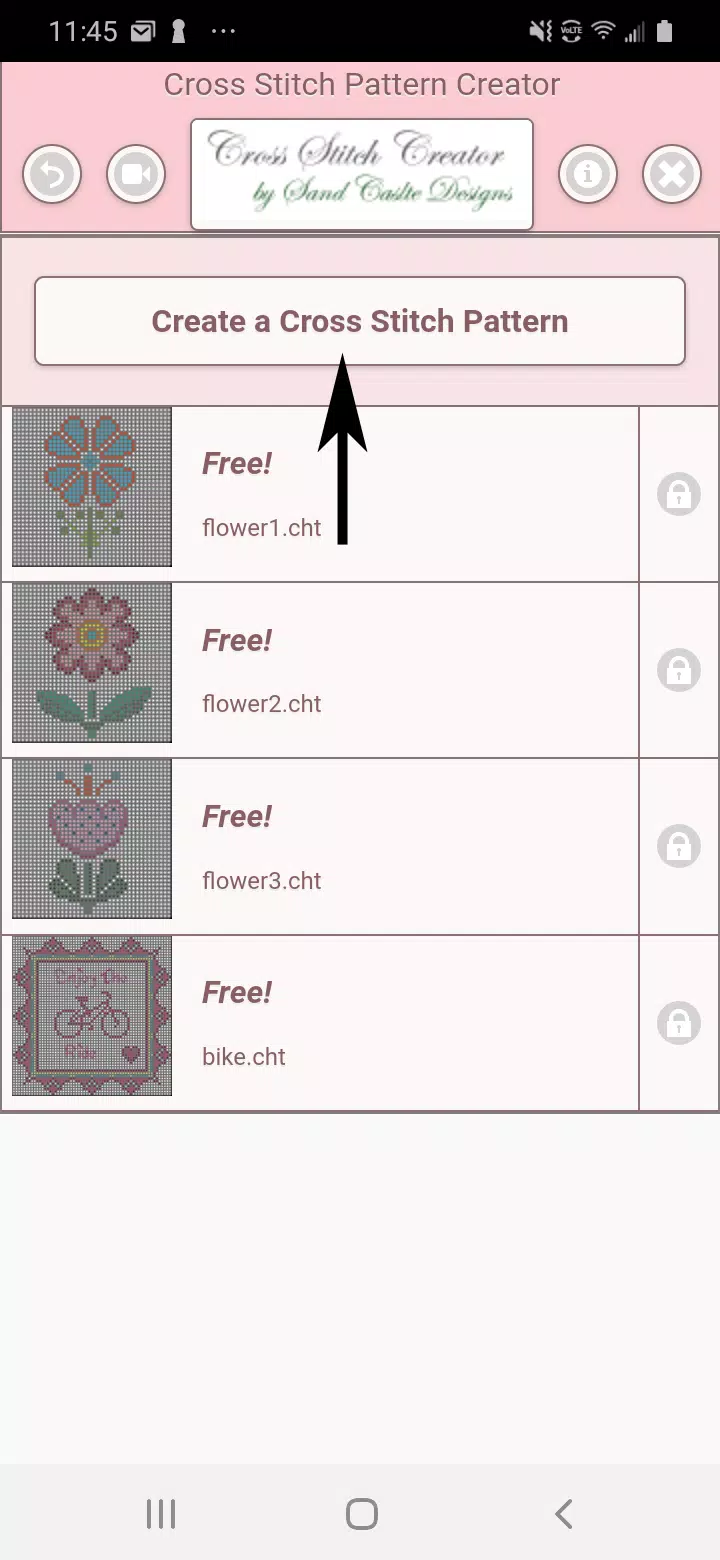
Includes 4 free sample patterns. Download at no cost. Full activation requires a $2.99 payment.
無料サンプルとして4つのパターンが含まれています。無償でダウンロード可能。フル機能を利用するには2.99米ドルの支払いが必要です。
For optimal experience, we recommend using a tablet due to the pattern dimensions.
パターンのサイズを考慮すると、最適な体験のためにタブレットの使用をお勧めします。
Craft personalized cross stitch designs with our intuitive Cross Stitch Pattern Creator.
直感的なクロスステッチパターン作成ツールで、あなただけのオリジナルデザインを作りましょう。
Begin creating by clicking the "Create a Cross Stitch Pattern" button.
「Create a Cross Stitch Pattern」ボタンをクリックして作成を開始します。
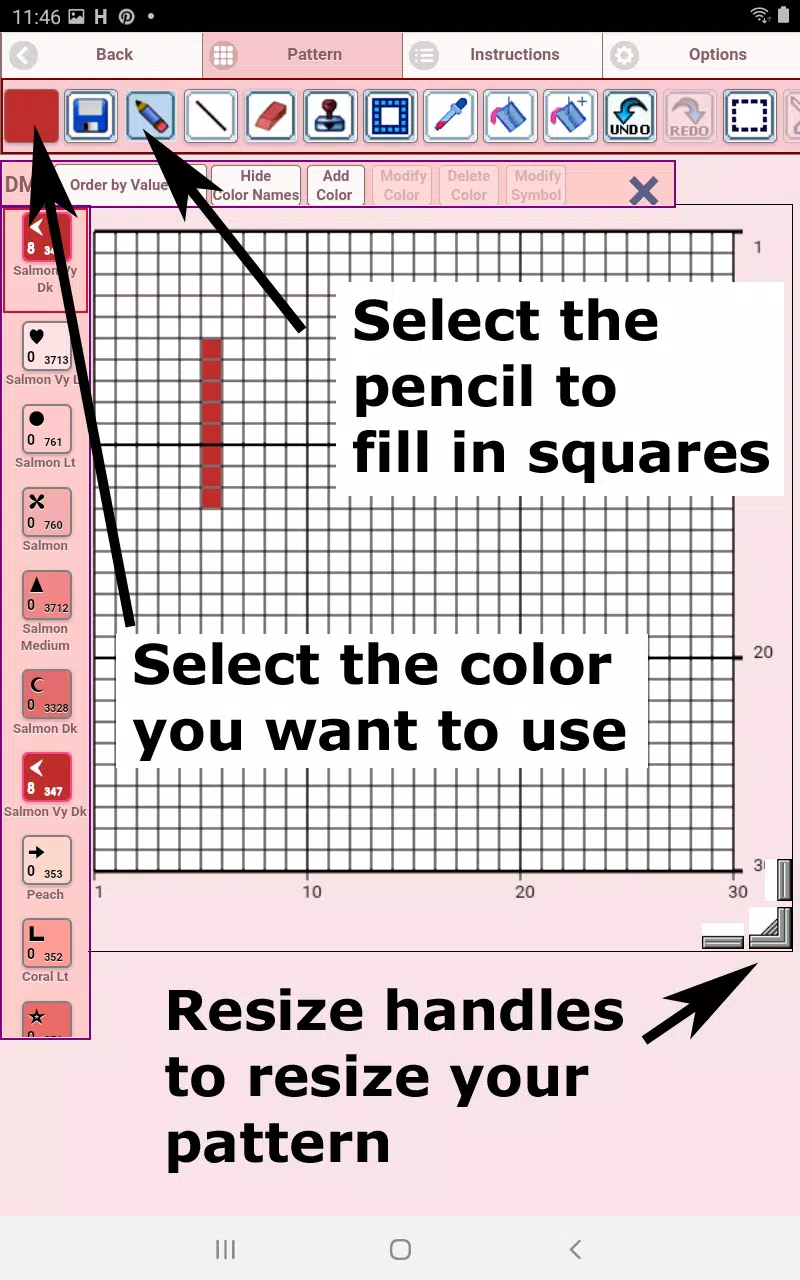
The Cross Stitch Pattern Editor will open, allowing you to color squares with DMC floss shades.
クロスステッチパターンエディターが開き、DMC刺しゅう糸の色で四角を塗りつぶすことができます。
Optionally, add custom colors to your palette.
必要に応じて、パレットに独自の色を追加することもできます。
Getting started is simple: Use the pencil tool to mark squares and the eraser to remove markings from your design.
使い方は簡単です:鉛筆ツールで四角をマーキングし、消しゴムツールでデザインからマーキングを削除します。
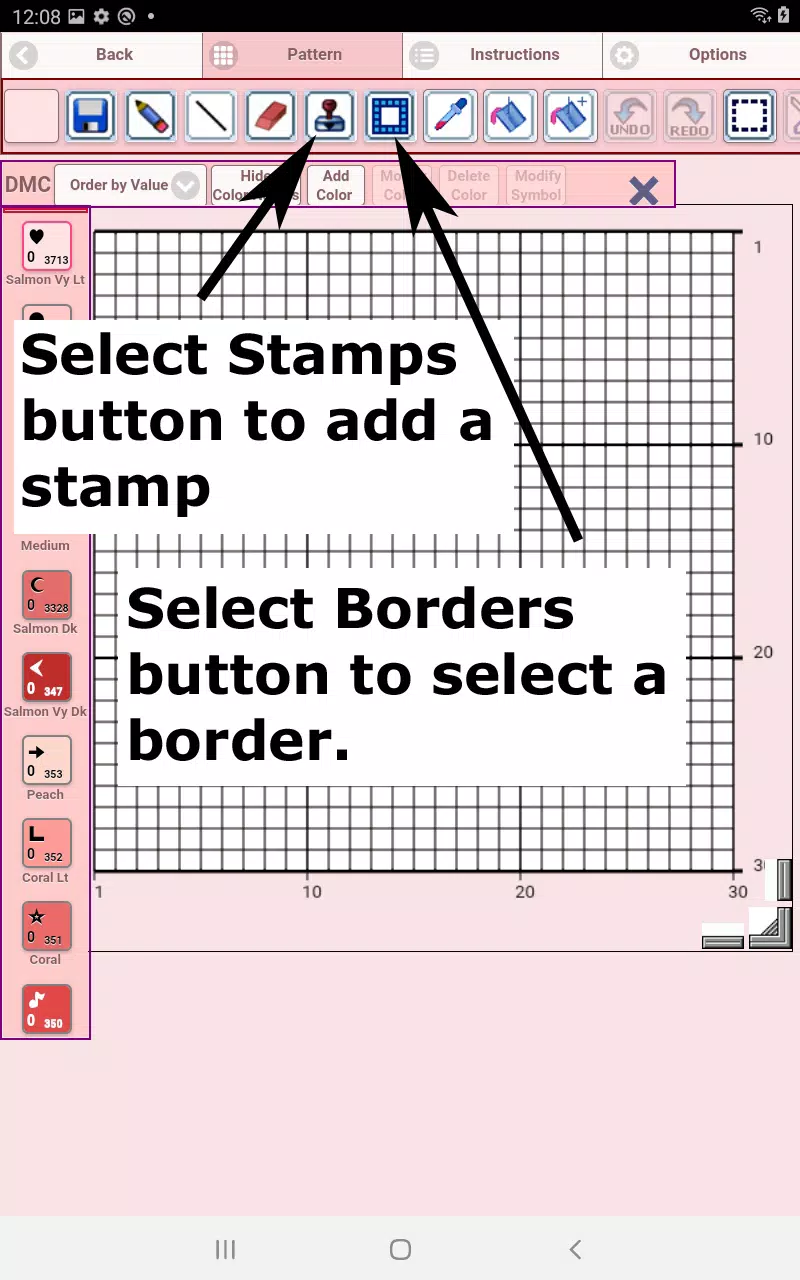
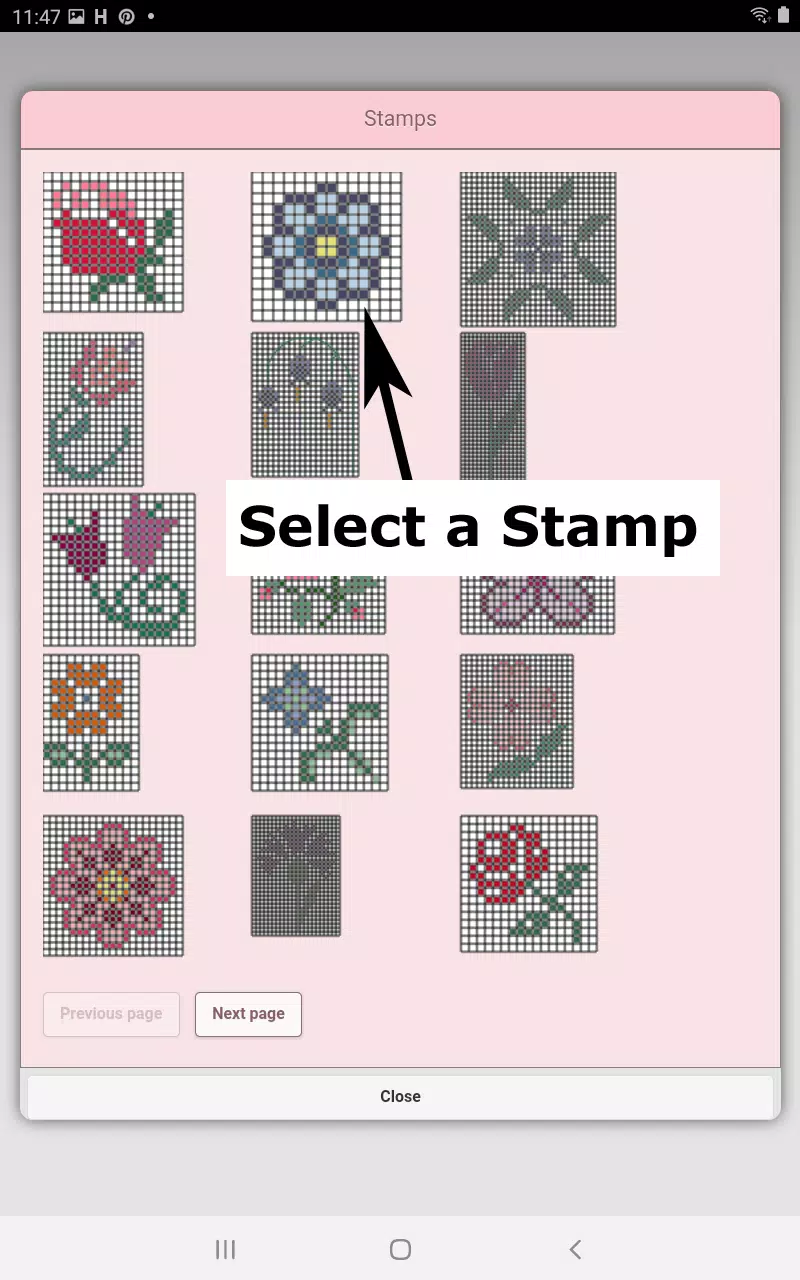
Enhance your patterns with our library of 80+ stamps and decorative borders.
80種類以上のスタンプと装飾的なボーダーのライブラリを使って、パターンを引き立てましょう。
The toolbar buttons from left to right include:
左から右へのツールバーボタンは以下の通りです:
DMC Floss Color - Choose your preferred thread color
DMC刺しゅう糸の色 - 好みの糸色を選択します
Save - Store your completed pattern
保存 - 完成したパターンを保存します
Pencil - Fill individual squares in your design
鉛筆 - デザイン内の個々の四角に色を塗ります
Eraser - Remove filled squares and backstitch lines
消しゴム - 塗りつぶされた四角とバックステッチの線を削除します
Backstitch - First select a color, then add stitching lines to your pattern
バックステッチ - まず色を選択してから、パターンにステッチラインを追加します
Backstitch Move - Drag existing backstitches to new positions
バックステッチ移動 - 既存のバックステッチを新しい位置へドラッグして移動します
Backstitch Adjust - Select a stitch and reposition its endpoints using the blue markers
バックステッチ調整 - ステッチを選択し、青いマーカーを使ってその端点を再配置します
Stamps - Add miniature cross stitch motifs to your design
スタンプ - デザインにミニチュアのクロスステッチモチーフを追加します
Borders - Apply decorative frames that automatically adapt to your pattern size
ボーダー - パターンのサイズに合わせて自動的に適応する装飾的な枠を適用します
Dropper - Sample and replicate colors from your existing pattern
スポイト - 既存のパターンから色をサンプリングして複製します
Bucket - Flood fill sections with your chosen color
バケツ - 選択した色で領域を一括塗りつぶしします
Bucket+ - Replace any color with your current selection
バケツプラス - 任意の色を現在の選択色に置き換えます
Undo - Reverse your most recent changes
元に戻す - 直近の変更を取り消します
Redo - Restore actions you've undone
やり直し - 取り消した操作を復元します
Selection Box - Mark areas for editing operations
選択ボックス - 編集対象の領域を指定します
Cut - Remove selected portions of your pattern after using the Selection Box
切り抜き - 選択ボックス使用後に、パターンの選択部分を削除します
Copy - Duplicate selected pattern sections to your clipboard
コピー - 選択したパターンセクションをクリップボードに複製します
Paste - Insert copied elements and reposition them as desired
貼り付け - コピーした要素を挿入し、必要に応じて再配置します
Rotate - Spin selected areas or the entire pattern
回転 - 選択領域または全体のパターンを回転させます
Flip Horizontal - Mirror sections or the complete design left/right
水平反転 - セクションまたは全体のデザインを左右に鏡像化します
Flip Vertical - Invert selections or the full pattern top/bottom
垂直反転 - 選択部分または全体のパターンを上下に反転させます
Zoom In - Enlarge the pattern view
ズームイン - パターンの表示を拡大します
Zoom Out - Reduce the pattern display size
ズームアウト - パターの表示サイズを縮小します
Symbols - Show unique identifiers for each thread color
記号 - 各糸色に固有の識別子を表示します
Picture - Convert photos from your device into stitchable patterns
画像 - デバイスの写真を刺しゅう可能なパターンに変換します
Share - Distribute your creations via email, messaging, or social platforms
共有 - メール、メッセージングアプリ、またはソーシャルプラットフォームを通じて作品を配布します
Resize Handles - Adjust pattern dimensions using the bottom-right corner controls
リサイズハンドル - 右下隅のコントロールを使ってパターンの寸法を調整します
Options - Customize grid colors, toggle between solid/X-style fills, and hide row/column counters
オプション - グリッドの色をカスタマイズし、塗りつぶしのスタイル(単色またはX字)を切り替え、行/列のカウンターを表示・非表示にします
Instructions - View DMC color references and finished sizes for various Aida fabric counts
説明書 - 各種アイダ布の糸数に応じたDMC色の参照と完成サイズを確認します
Preview - Visualize your stitched final product with adjustable fabric backgrounds
プレビュー - 調整可能な生地背景を使って、刺しゅう仕上げ後のイメージを視覚化します
スクリーンショット
 レビュー
コメントを投稿する+
最新のアプリ
もっと+
レビュー
コメントを投稿する+
最新のアプリ
もっと+
-
 Analogous City
アートデザイン 丨 74.5 MB
 ダウンロード
-
 Animagic
アートデザイン 丨 49.2 MB
ダウンロード
-
 HG HYPER GRINDER
おしゃれな生活 丨 12.20M
ダウンロード
-
 Go Share
自動車と乗り物 丨 8.8 MB
ダウンロード
-
 Full Long Screenshot Capture
ツール 丨 25.10M
ダウンロード
-
 Peperonity Girls Chat
通信 丨 4.40M
ダウンロード
同様の推奨事項
もっと+
トップニュース
もっと+
-
 Pokémon GO 新規参入者向けの成長促進チケットを導入
Jan 12,2025
-
 PokémonGoFest 2025:古代の巨人との穏やかな隠れ家
May 28,2025
-
 PokémonGoは、チリとインドでWayfarer Challengeを発売します
May 14,2025
-
 ポケモンの眠り甘いお菓子:クックブックは夢のようなデザートを明らかにします
Feb 22,2025
トピック
もっと+
Trending apps
もっと+
-
1

deutsch lernen durch hören A137.20M
ドイツ語を迅速かつ効率的に学びたいですか? Deutsch Lernen DurchHörenA1アプリは、言語習得に対するユニークなリスニングベースのアプローチを提供します。 旅行、ビジネス、日常生活のための実用的なフレーズに焦点を当てたこのアプリは、ドイツの学習を便利でポータブルにします。 あなたが物を持っているかどうか
-
2

Hêvî TV Pro15.20M
ヘビTV Proでクルド語とトルコのエンターテイメントの世界を解き放ちます!この使いやすいアプリを使用すると、お気に入りのテレビチャンネルを見事なフルHDでストリーミングできます。さらに、いつでもどこでも幅広いラジオ局をお楽しみいただけます。最新のニュース、音楽、ショーを最新の状態に保ってください - リラックスしているかどうか
-
3

کلینیک فوق تخصصی کاشت مو و ابر6.50M
プレミアヘアと眉移植クリニックの導入:この主要な超専門クリニックで、比類のない髪と眉移植サービスを体験してください。 イランのナショナルフットボールチームの元メンバーが率いるこのクリニックは、100%を保証する25年以上の経験を誇っています
-
4

EL PAÍS49.44M
EL PAÍS アプリで情報とエンターテイメントの世界に浸ってください。 世界中で 6,500 万人以上の購読者を誇るこの権威ある雑誌は、洞察力に富んだ報道、編集の独立性、革新的なジャーナリズムへの取り組みで知られています。膨大な記事コレクションを探索する
-
5

Рольф: продажа и покупка авто64.1 MB
ロルフ:便利な中古車の売買および自動車サービスアプリケーション ロシア最大の自動車ディーラーであるロルフは、中古車を迅速に売買し、包括的な自動車サービスを提供できる公式アプリを立ち上げます。アプリケーション機能には、中古車の検索と購入、車の診断、修理、メンテナンス、スペアパーツの供給が含まれます。 ロルフについて 1991年に設立されたロルフは、現在「中古車の販売」の分野で最初にランクされており、ロシアの自動車市場に多数のモデルとサービスを提供しています。同社には、モスクワとサンクトペテルブルクをカバーする50を超える展示会ホールと3つの大規模な中古車トレーディングセンターがあります。ブランドポートフォリオは、アウディ、北京自動車、ボーグワード、BMW、チェリー、クライスラー、エボリュート、エキスエディエット、フォード、ジェネシス、ハバルH6、ハバルH9、ヒュンダイ、ジャック、ジャガー、ジープ、ジェットール、カイイ、キアイ、キアイなど、34の自動車ブランドをカバーしています。 、ランドローバー、レクサス、マズ
-
6

La République des Pyrénées28.00M
必須の La République des Pyrénées アプリを使用して、ピレネー、ベアン、ソウル地域に関する最新情報を入手してください。 このアプリは専門編集者によって厳選され、あなたの興味に合わせたトップニュース記事を配信します。地元のイベント、スポーツ、ビジネス、その他のトピックに興味があるかどうかにかかわらず、このアプリはさまざまな情報を提供します。
84.3 MB
ダウンロード39.1 MB
ダウンロード46.0 MB
ダウンロード80.4 MB
ダウンロード23.0 MB
ダウンロード29.7M
ダウンロード