

Archero 2, the highly anticipated follow-up to the beloved roguelike RPG Archero, made its debut last year to the delight of fans everywhere. With a plethora of new characters and diverse game modes, players now have even more reasons to dive in and stay engaged. The sequel introduces exciting new bosses, minion varieties, and skills that significantly enhance the game's depth and complexity. For those looking to sharpen their archery skills, this guide is packed with essential tips and tricks to make your journey through Archero 2 more strategic and rewarding. Let's dive into the specifics below!
Tip #1: Choosing the Right Character
One of the standout features of Archero 2 is the expanded roster of characters. Gone are the days of sticking to a basic character design; you can now unlock a variety of custom-themed characters, each offering a unique playstyle and build path. Characters like Dracoola and Otta, for instance, outshine the starting characters such as Alex with their superior abilities. By unlocking these more powerful characters, you not only gain access to different tactical approaches but also benefit from the level-specific boosts each character receives. Currently, there are 6 characters available, each with their own distinctive advantages.
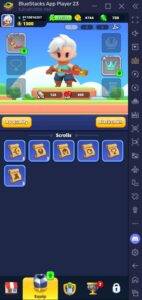
Tip #5: Make Mindful Purchases from the Shop
As a live-service game, Archero 2 offers various avenues for progression, including the option of microtransactions through the in-game shop. However, savvy free-to-play players can uncover hidden treasures in the shop without spending a dime. You can use your accumulated Gems, the game's freemium currency, to purchase valuable items. Keep an eye out for character shards, scrolls, and high-quality gear pieces in the Daily shop, which refreshes periodically. It's crucial to check the shop daily to not miss out on these opportunities. Among all the items available, character shards should be your top priority for purchases from the shop.
To enhance your gaming experience even further, consider playing Archero 2 on a larger screen using BlueStacks on your PC or laptop, along with the precision of a keyboard and mouse.
 Latest Downloads
 Downlaod


 Top News








