

Mastering Minecraft Mob Elimination: A Comprehensive Guide to the /kill Command
There are many reasons to eliminate mobs in Minecraft. The most efficient method is using commands, specifically the /kill command. While seemingly simple, this command offers nuanced control. This guide details how to effectively use /kill to target various mobs.
Prerequisites: Enabling Cheats
Before using any commands, ensure your Minecraft world has cheats enabled. Instructions for both Java and Bedrock editions are provided below.
Utilizing the /kill Command
The basic /kill command, entered in the chat box, will unfortunately kill you. To target mobs, you need to add specific syntax.
-
Killing All Mobs:
/kill @e[type=!minecraft:player]This targets all entities (@e) except players (type=!minecraft:player). -
Killing Specific Mob Types:
/kill @e[type=minecraft:chicken]This command eliminates all chickens. Replaceminecraft:chickenwith the desired mob type (e.g.,minecraft:sheep,minecraft:zombie). -
Targeting Mobs by Distance:
- Java Edition:
/kill @e[distance=..15]This kills all entities within 15 blocks. Adjust15as needed. - Bedrock Edition:
/kill @e[r=10]This achieves the same result, usingrto specify radius.
- Java Edition:
-
Combining Type and Distance:
- Java Edition:
/kill @e[distance=..15,type=minecraft:sheep]Kills all sheep within 15 blocks. - Bedrock Edition:
/kill @e[r=10,type=minecraft:sheep]Same functionality for Bedrock.
- Java Edition:
Command autocompletion is helpful; you don't need to memorize the exact syntax.
Key Selectors:
Understanding these selectors is crucial:
@p: Nearest player@r: Random player@a: All players@e: All entities@s: Yourself
Enabling Cheats in Minecraft:
Java Edition:
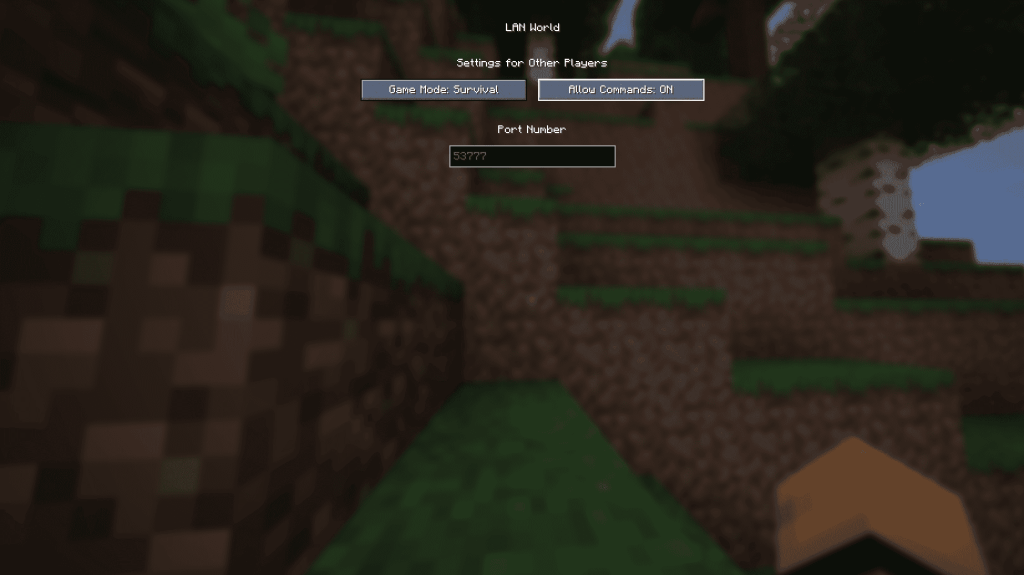
- Enter your world.
- Press Esc, then select "Open to LAN."
- Toggle "Allow Commands" to "On." This is temporary; you'll need to repeat this each session. For permanent cheats, create a world copy with cheats enabled via the "Re-create" option in the Singleplayer menu.
Bedrock Edition:
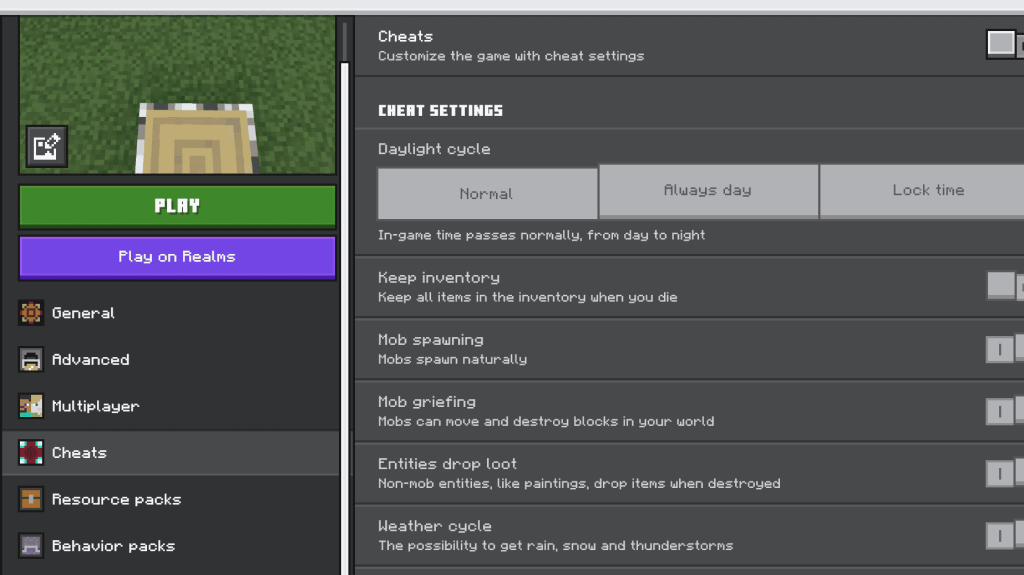
- Navigate to your worlds.
- Click the pencil icon next to the desired world.
- In the settings, toggle "Cheats" to "On."
With these instructions, you're equipped to effectively manage mob populations in your Minecraft world. Minecraft is available on PlayStation, Xbox, Nintendo Switch, PC, and mobile devices.
 Latest Downloads
 Downlaod




 Top News








