

Dive into the thrilling world of *Ninja Time*, a captivating Roblox game that's all the rage right now. For those eager to master the game's intricacies, including clans, bosses, weapons, and the intriguing Red Eyes, the *Ninja Time* Trello Board and Discord Channel are your ultimate resources. The Discord was so buzzing that the verification bot struggled to keep up two weeks ago due to high traffic. Here's your guide to accessing these vibrant community hubs.
*Ninja Time* Trello & Discord Guide
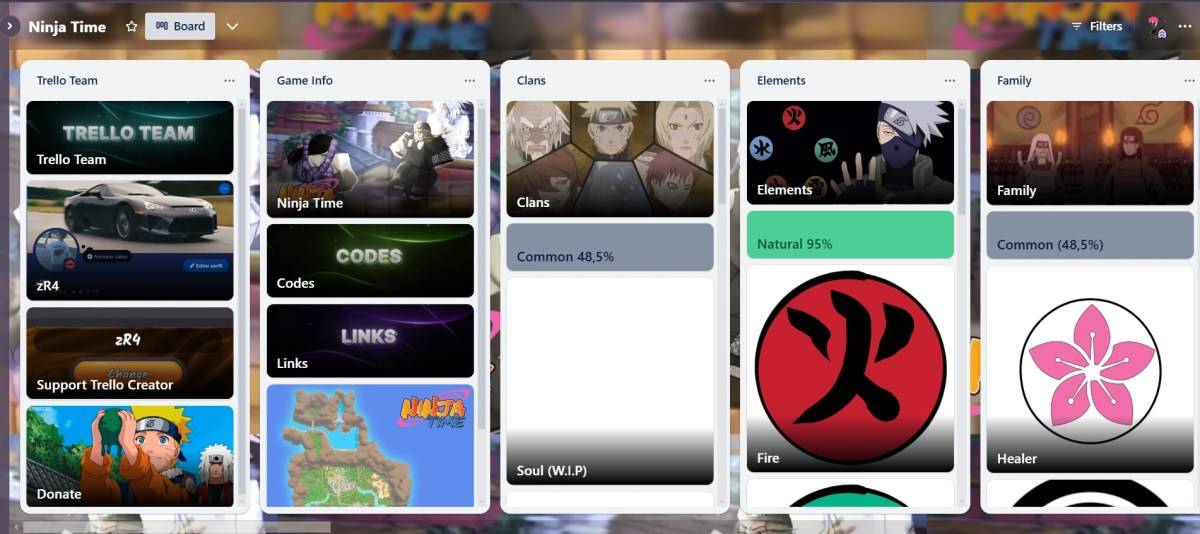
Here's a rundown of all the *Ninja Time* community channels you should check out:
- Ninja Time Trello Board
- Ninja Time Discord Server
- Vibrant Ninja Time Roblox Group
- Ninja Time X/Twitter Page
Before you embark on your epic ninja journey, we strongly recommend consulting the Trello board. It's an essential starter pack for all aspiring ninjas, loaded with vital information to get you started on the right foot. Here’s a detailed list of what you can find:
- All about the game info (Codes, Links, Map of Fire Country)
- All clans
- All elements
- Family
- Red Eyes
- Sub-Jutsus
- All modes
- Skills Modes
- All Bosses
- Raid Boss
- Raid Drops
- All NPCs
- All Consumables (Buffs)
- Accessories
- All Weapons
- Sub Weapons
- Exclusive Collectables
- Other Info (Achievements, Gamepasses, etc.)
While the Discord server might not match the Trello board in terms of basic game information, it excels in other crucial areas like **codes and giveaways**, and even boasts a dedicated fan art section. The *Ninja Time* Discord server is a dynamic **chat-based community** where socializing and information sharing thrive, available in English, Portuguese, Spanish, and French.
I personally frequent the Discord to explore intriguing **questions and game suggestions**, as it's a fertile ground for new ideas. It's also the perfect place to find a *Ninja Time* party member or stay updated with the **latest game developments**.
How to Search *Ninja Time* on Trello and Discord?
| **Prefix** | **Use** | **Prefix** | **Use** |
| **in:** channel-name | Enables search-specific channels like the #questions one (in: questions). | **before:** date | Look for messages sent before a specific date. |
| **from:** username | Find messages from a specific user. | **after:** date | Use to find messages that were sent after a certain date. |
| **has:** image | Search for all the messages that contain images. | **pinned:** true | Locate all messages that are pinned on the server. |
**That wraps up our *Ninja Time* Trello and Discord guide. Before you dive into your adventure, be sure to check out our *Ninja Time* codes to give yourself a head start. You won't want to miss them.**
 Latest Downloads
 Downlaod


 Top News








