

Week 2 of The Sims 4's Blast from the Past event presents a museum-based challenge: studying a Historical Display. This guide explains how to complete this seemingly simple, yet surprisingly problematic, task.
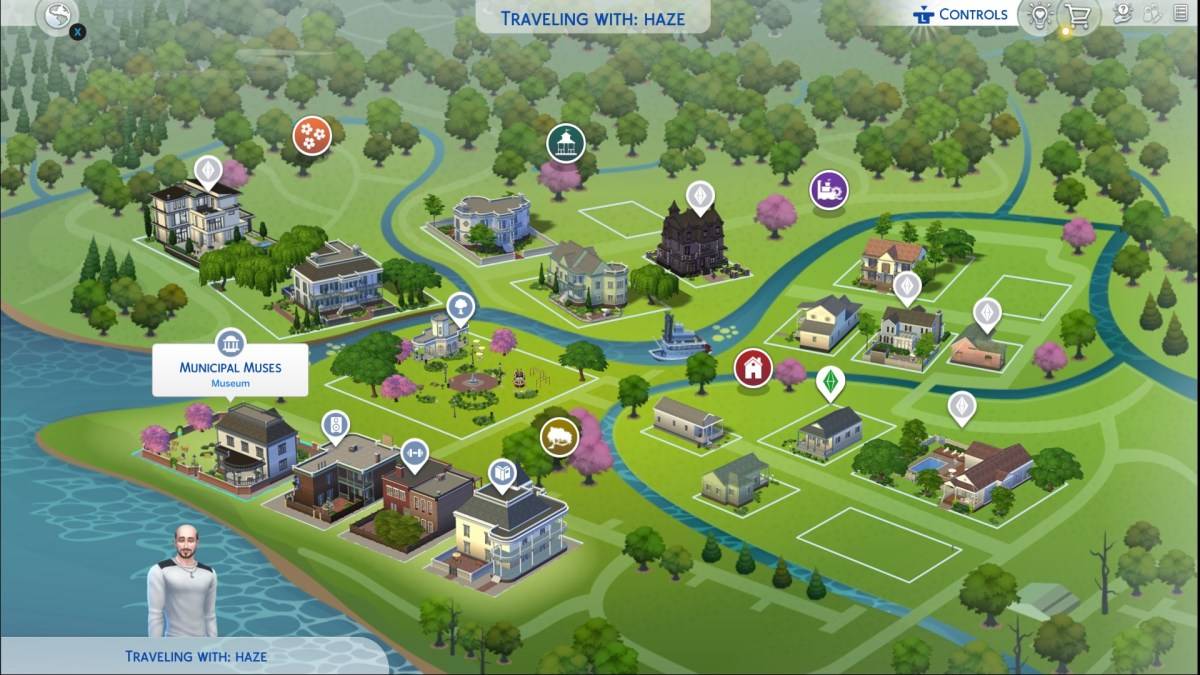
Locating a Museum
To begin, locate a museum on your in-game map. Look for the building icon depicting pillars. While several exist, the Municipal Museum in Willow Creek and The Future's Past in Oasis Springs are conveniently located near other event objectives.
Completing the Challenge
Once inside the museum, interact with either a painting or sculpture (both qualify as Historical Displays). Select the "View" option. The successful completion will be indicated by the appearance of the Emit icon.
Troubleshooting Common Issues
Many players report difficulty with this quest, often due to conflicting mods. If the "View" option is unavailable, consider temporarily disabling mods to resolve the problem. If the issue persists after removing mods, try interacting with multiple displays in different museums. Hopefully, EA will address this bug soon.
All Week 2 Quests
Successfully studying a Historical Display is only one step in completing Week 2's challenges. The full list includes:
Echoes of Time:
- Read the History of Time Travel at a Library
- Experience the Past by Playing The Sims Archives vol. 2
- Study a Historical Display at a Museum
- Ask an Elder about the Shard
- Research Shards of Time
- Search Objects for Shards of Time (3)
- Show Emit the Shards of Time
Inventing the Past:
- Read Theoretical Electronics at a Library
- Collect Platinum
- Collect Ironyum
- Repair Something (Handiness Level 2 or Higher)
- Exercise Your Mind (Logic Level 2 or Higher)
- Obtain an Electronic Upgrade Part
- Build the Time Travel Component
The Sims 4 is available on PlayStation, Xbox, and PC.
 Latest Downloads
 Downlaod




 Top News








